OptimizeIt
Platform
PricingResourcesFAQAbout
General & specialty contractors comparison

OptimizeIt vs Contractor Foreman

Compare Contractor Foreman alternatives using a project with a real subcontractor bid, a customer proposal and a schedule change. Broad feature lists matter less than the handoffs your team needs each day.

Start Your 14-Day Free Trial Compare OptimizeIt plans

14-day free trial. No credit card required to start. Choose a plan and enter payment details to continue. No automatic charge.

Compare featuresSee OptimizeItOfficial sources

Choose Contractor Foreman if…

  • You want its broad construction-management feature set.
  • You need estimates with stored materials, markups and online approvals.
  • You want to evaluate bid management, subcontracts and scheduling dependencies.

Choose OptimizeIt if…

  • You want trade-aware intake and editable Opti-assisted scope.
  • You want estimates connected to projects and customer approvals.
  • You want owner-reviewed Lead Desk drafts before enabling automation.
The everyday work

Compare the workflow. Then the cost.

Compare the tools each product describes for your work. Feature availability, usage and optional services matter more than a simple checkmark.

WorkflowOptimizeItContractor Foreman

Estimate & approval

OptimizeItEditable estimates, line items and customer approvals with owner-reviewed scope and rates.
Contractor ForemanEstimates support stored materials/pricing, bulk or line-item markups, branded proposals and online approval.

Changing schedule

OptimizeItConnected project scope and scheduling; check legitimate work and financial history when scope changes.
Contractor ForemanScheduling describes Gantt charts, dependencies and adjustments when tasks move.

Subcontractor workflow

OptimizeItProject work-order and subcontractor cost/balance workflows; validate the exact approvals and records you need.
Contractor ForemanBid management compares vendor bids and can turn selected bids into purchase orders or subcontracts.

Package fit

OptimizeItTrial the actual tools and team permissions before switching.
Contractor ForemanPlans differ by user level and selected package. Confirm live inclusions and renewal terms directly.

Team & billing

OptimizeItStarter: one user. Core, Plus and Pro: unlimited users. Software access and usage allowances are listed separately.
Contractor ForemanCheck Contractor Foreman’s selected package, user limits, renewal terms and optional services.
Compare your actual configuration. Confirm Contractor Foreman’s current package, users, usage, integrations and optional services directly. Promotions, renewal prices and add-ons can change. Check the official sources below.
Inside OptimizeIt

Real screens. Connected work.

Actual OptimizeIt demonstration accounts—not mockups or competitor screens.

Review the estimate before sending.

Check customer details, editable line items and the customer preview in the same estimate workspace.
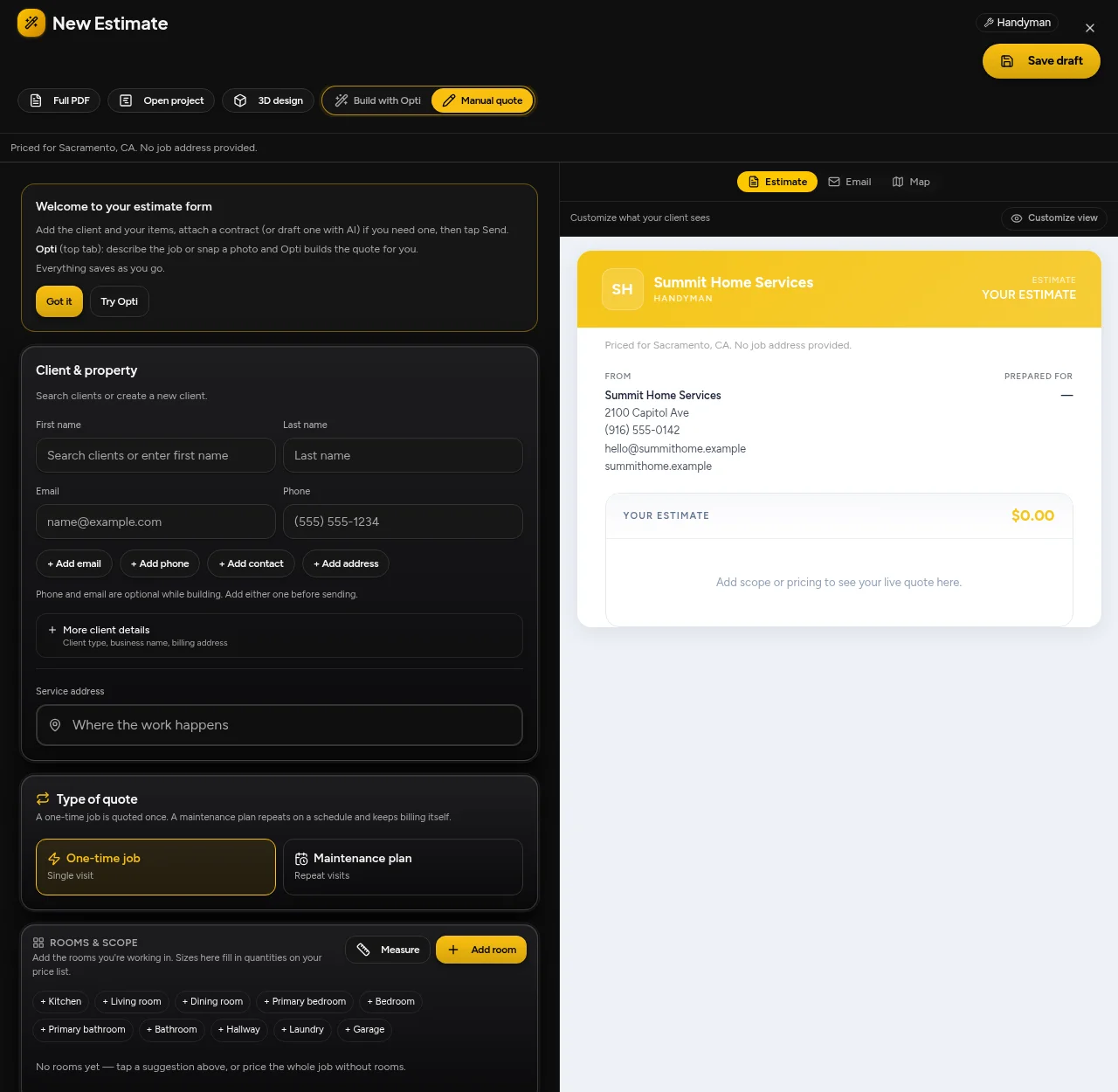
OptimizeIt · estimate editor and customer preview
OptimizeIt · estimate editor and customer preview · Demonstration account

Keep signed work moving.

Review the next booking or scheduling action without rebuilding the customer record.
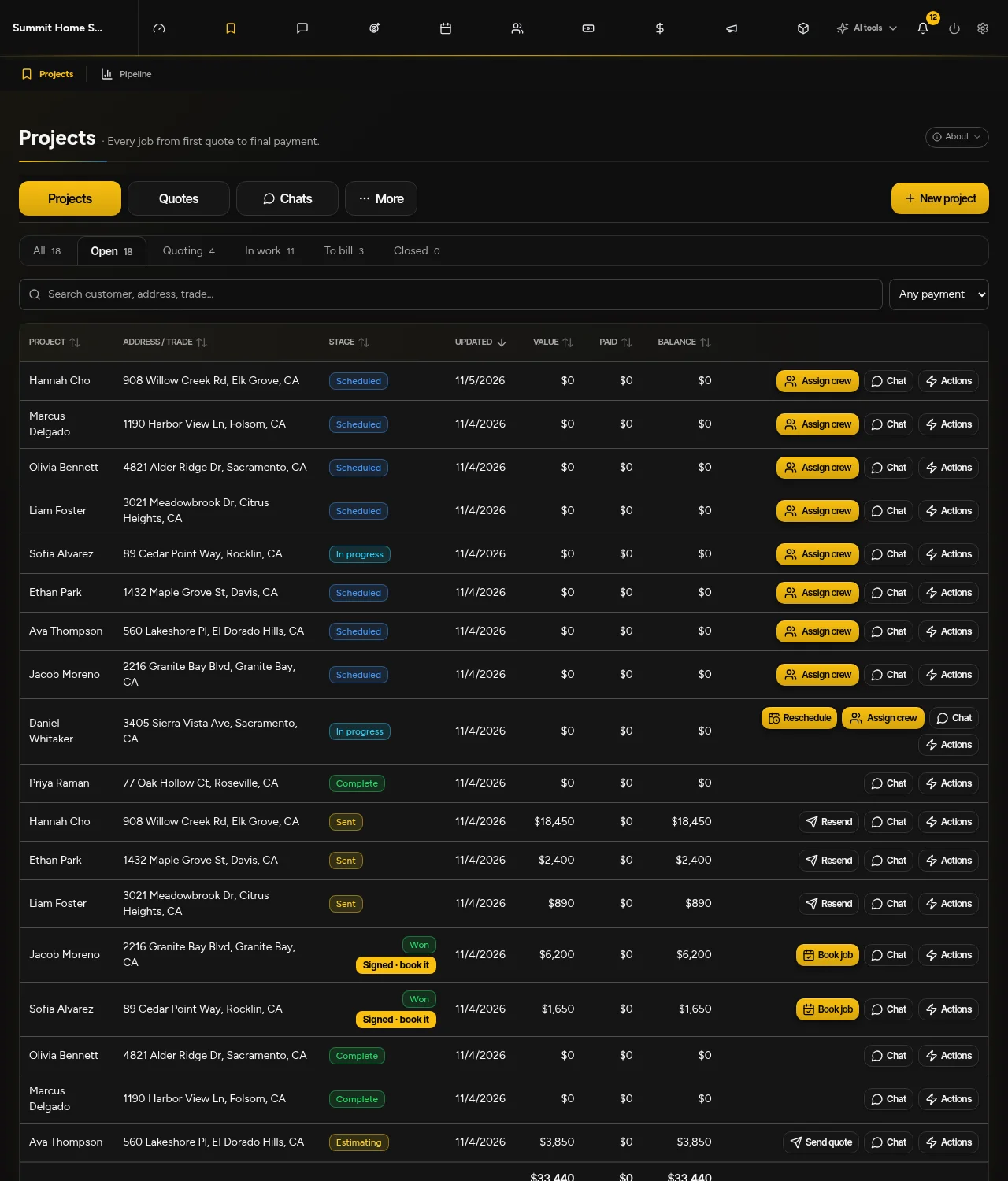
OptimizeIt · projects, signed quotes, booking and rescheduling
OptimizeIt · projects, signed quotes, booking and rescheduling · Demonstration account
Why consider OptimizeIt?

Less starting over. More moving forward.

Start with a representative job

Editable estimates, line items and customer approvals with owner-reviewed scope and rates.

Test the handoff

Connected project scope and scheduling; check legitimate work and financial history when scope changes.

Review before automating

Lead Desk defaults to Drafts only. Optional instant replies and eligible callbacks require setup, channel permissions and consent.

Use sample work first. Confirm data exports, import scope and required integrations before cancelling your current system. Keep one authoritative customer and project record; automatic synchronization is not assumed.

Good questions

Know before you start.

What should I check in a Contractor Foreman comparison?

Use one project containing an estimate revision, subcontractor bid and schedule change. Compare approvals, records, dependencies and customer visibility. Contractor Foreman has multiple user/package levels, so obtain the current plan details rather than relying on an introductory price or a generic feature list.

How should I compare the total software cost?

Include the software plan, team access, phone answering, usage, add-ons and implementation. Compare renewal terms, not only introductory rates. OptimizeIt AI Voice Agent access is on Pro; agent-minute allowances are separate from ordinary phone minutes.

Will all my existing data transfer automatically?

No automatic transfer is promised. Confirm available exports, required record types and import scope with our team, then review sample records before cancelling your existing system.

What happens after the free trial?

14-day free trial. No credit card required to start. Saved work becomes view-only after an unpaid trial expires. Choose a plan and enter payment details to continue. No automatic charge.

Check the details

Official sources, not assumptions.

Official material reviewed November 5, 2026. We publish this comparison as OptimizeIt, not an independent review site. Exact competitor prices are not quoted because selected team sizes, promotions and add-ons change the total.

  • Contractor Foreman estimate tools
  • Contractor Foreman plans
OptimizeIt plans and usage allowances
More ways to compare

Find the right fit for your team.

OptimizeIt vs Housecall Pro

A clearer look at estimates, dispatch and customer follow-up. See where each product fits—and what to check before you switch.

Compare Housecall Pro

OptimizeIt vs Handoff

Looking for a Handoff AI alternative? Compare how a written scope, photo or plan becomes a reviewed estimate—and what happens when the customer approves it. Both products offer AI assistance; the difference is the workflow and plan you actually need.

Compare Handoff

OptimizeIt vs Buildertrend

Evaluating Buildertrend alternatives? Compare a residential project from its cost catalog and proposal through the budget, schedule and customer handoff—not a service-call checklist.

Compare Buildertrend
All software comparisons

Try it with your next job.

14-day free trial. No credit card required to start.

Start Your 14-Day Free Trial
OptimizeIt

Your business software. Your AI workforce. One connected way to work.

Product

PlatformFeaturesMovingPricing

Learn

ResourcesSoftware comparisonsService business fit quizMoving company fit quizLocal market guidesFAQBook a demoIndustries

Company

AboutLog inPrivacyTerms
© 2026 OptimizeItBuilt for the people who do the work.