OptimizeIt
Platform
PricingResourcesFAQAbout
Junk removal & hauling comparison

OptimizeIt vs Vonigo

Compare a cleanout from online booking to disposal notes and collection. Vonigo has a dedicated junk-removal offering; OptimizeIt supports hauling intake and operator-reviewed estimating.

Start Your 14-Day Free Trial Compare OptimizeIt plans

14-day free trial. No credit card required to start. Choose a plan and enter payment details to continue. No automatic charge.

Compare featuresSee OptimizeItOfficial sources

Choose Vonigo if…

  • You need Vonigo’s junk-removal booking and routing tools.
  • You rely on volume-based pricing and disposal notes.
  • You need configurable work orders or multi-location support.

Choose OptimizeIt if…

  • You want trade-aware intake and editable Opti-assisted scope.
  • You want estimates connected to projects and customer approvals.
  • You want owner-reviewed Lead Desk drafts before enabling automation.
The everyday work

Compare the workflow. Then the cost.

Compare the tools each product describes for your work. Feature availability, usage and optional services matter more than a simple checkmark.

WorkflowOptimizeItVonigo

Cleanout intake

OptimizeItSupported photos and job details feed an editable quote; confirm load size and special items.
VonigoOnline booking, centralized job details and notes.

Load pricing

OptimizeItHauling rate cards and editable estimates; operator confirms volume, disposal and access requirements.
VonigoVolume-based pricing and disposal notes.

Trucks & routes

OptimizeItCrew assignments and route-planning workspace; dispatch changes require review.
VonigoCrew/truck assignment, scheduling and routing.

Closeout

OptimizeItInvoices, customer payment setup and remaining balance records.
VonigoWork orders, invoicing, payments, reporting and customer updates.

Team & billing

OptimizeItStarter: one user. Core, Plus and Pro: unlimited users. Software access and usage allowances are listed separately.
VonigoCheck Vonigo’s selected package, user limits, renewal terms and optional services.
Compare your actual configuration. Confirm Vonigo’s current package, users, usage, integrations and optional services directly. Promotions, renewal prices and add-ons can change. Check the official sources below.
Inside OptimizeIt

Real screens. Connected work.

Actual OptimizeIt demonstration accounts—not mockups or competitor screens.

Review the estimate before sending.

Check customer details, editable line items and the customer preview in the same estimate workspace.
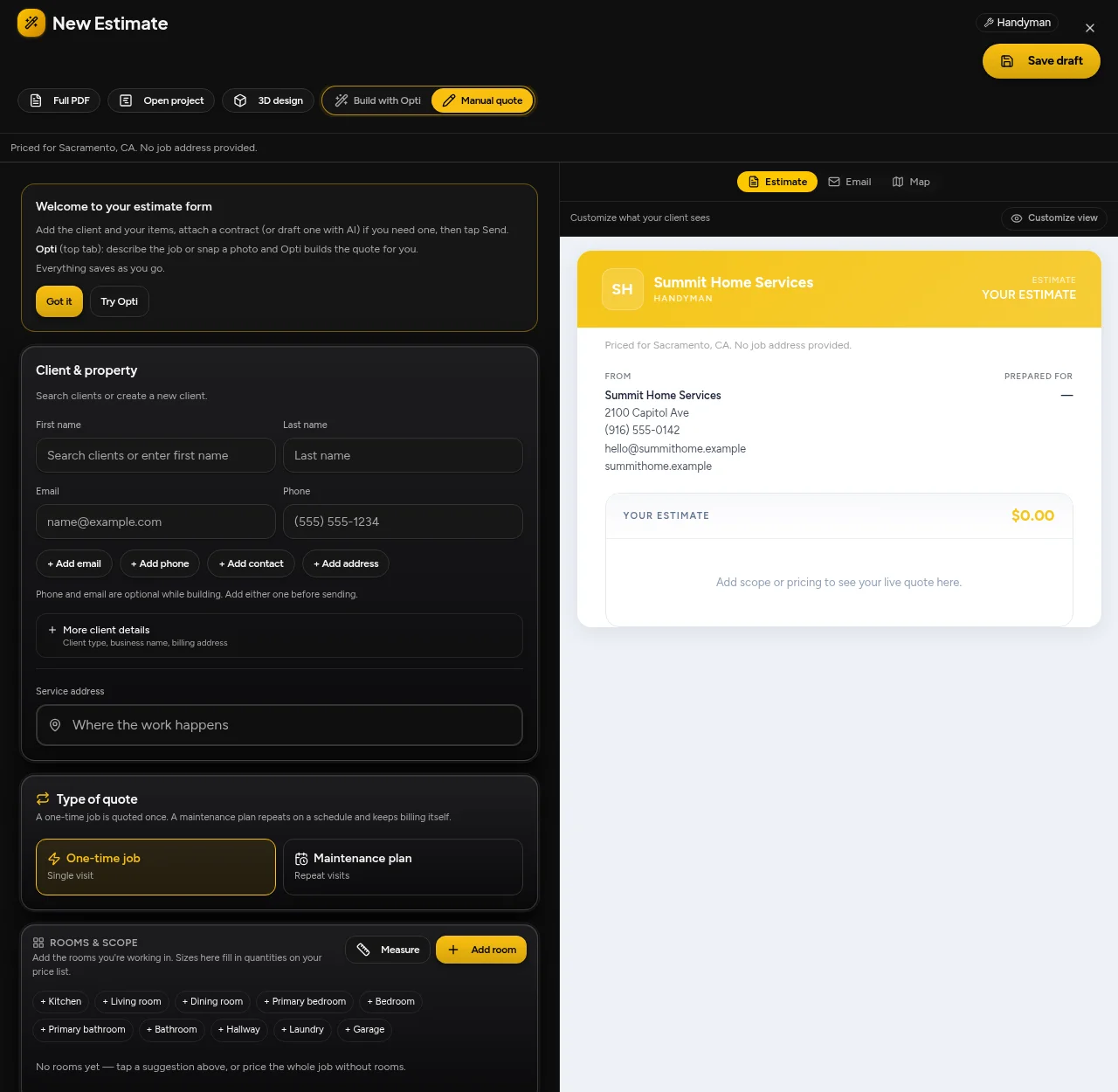
OptimizeIt · estimate editor and customer preview
OptimizeIt · estimate editor and customer preview · Demonstration account

Keep signed work moving.

Review the next booking or scheduling action without rebuilding the customer record.
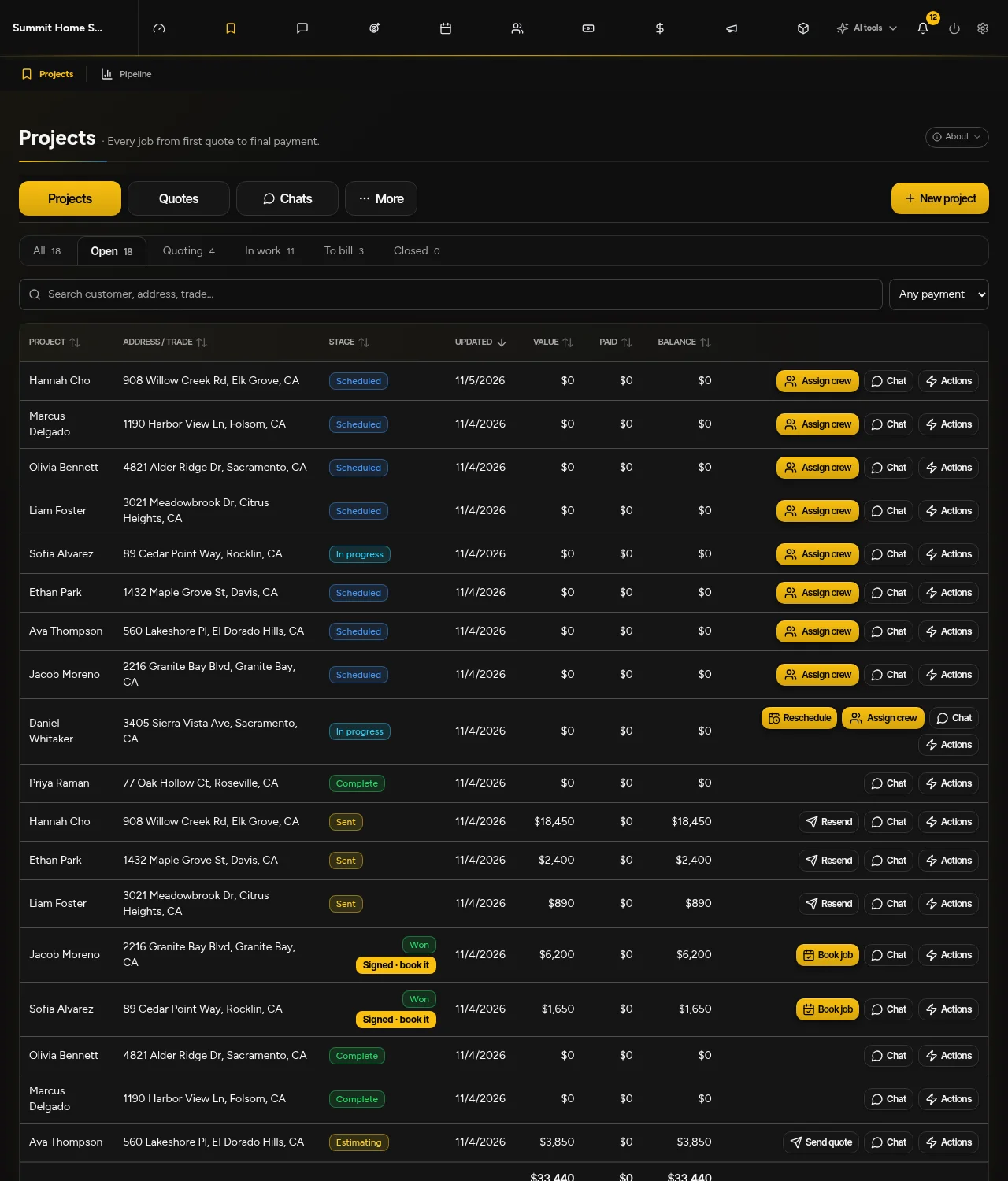
OptimizeIt · projects, signed quotes, booking and rescheduling
OptimizeIt · projects, signed quotes, booking and rescheduling · Demonstration account
Why consider OptimizeIt?

Less starting over. More moving forward.

Start with a representative job

Supported photos and job details feed an editable quote; confirm load size and special items.

Test the handoff

Hauling rate cards and editable estimates; operator confirms volume, disposal and access requirements.

Review before automating

Lead Desk defaults to Drafts only. Optional instant replies and eligible callbacks require setup, channel permissions and consent.

Use sample work first. Confirm data exports, import scope and required integrations before cancelling your current system. Keep one authoritative customer and project record; automatic synchronization is not assumed.

Good questions

Know before you start.

Is Vonigo only for junk removal?

No. Vonigo is a broader field-service platform with a dedicated junk-removal offering. Its public pages describe configurable capabilities and multi-location support. Ask which modules, implementation services and usage limits are included for your operation.

How should I compare the total software cost?

Include the software plan, team access, phone answering, usage, add-ons and implementation. Compare renewal terms, not only introductory rates. OptimizeIt AI Voice Agent access is on Pro; agent-minute allowances are separate from ordinary phone minutes.

Will all my existing data transfer automatically?

No automatic transfer is promised. Confirm available exports, required record types and import scope with our team, then review sample records before cancelling your existing system.

What happens after the free trial?

14-day free trial. No credit card required to start. Saved work becomes view-only after an unpaid trial expires. Choose a plan and enter payment details to continue. No automatic charge.

Check the details

Official sources, not assumptions.

Official material reviewed November 5, 2026. We publish this comparison as OptimizeIt, not an independent review site. Exact competitor prices are not quoted because selected team sizes, promotions and add-ons change the total.

  • Vonigo junk-removal software
  • Vonigo field-service platform
OptimizeIt plans and usage allowances
More ways to compare

Find the right fit for your team.

OptimizeIt vs Workiz

Compare how a pickup request becomes a quote, a truck assignment and a paid project. Workiz offers a dedicated junk-removal workflow; OptimizeIt brings trade-aware intake and editable estimate assistance.

Compare Workiz
All software comparisons

Try it with your next job.

14-day free trial. No credit card required to start.

Start Your 14-Day Free Trial
OptimizeIt

Your business software. Your AI workforce. One connected way to work.

Product

PlatformFeaturesMovingPricing

Learn

ResourcesSoftware comparisonsService business fit quizMoving company fit quizLocal market guidesFAQBook a demoIndustries

Company

AboutLog inPrivacyTerms
© 2026 OptimizeItBuilt for the people who do the work.